

Are you struggling with how to organise photos on your phone?
If you’re anything like most people, your phone contains thousands of photos. Family moments, holidays, pets, screenshots, accidental shots of the floor, photos you meant to delete but never did. And despite the AI search tools built into modern phones, finding a specific photo can still be surprisingly frustrating.
You know the one I mean. You know it exists. You roughly know when you took it. And yet it just won’t show up.
What might surprise you is that this isn’t because you’re disorganised or doing something wrong. Even as a professional photographer, with a very robust system for managing client images, my own personal phone photos are in one big mess. I rely on search, just like everyone else, and get annoyed when it doesn’t find the image I’m looking for.
If that sounds familiar, this post is for you.
This isn’t about creating a perfect photo library or spending hours sorting albums. It’s about reducing frustration, lightening the load, and making your photos easier to find, without turning it into a big, painful project.
Why photo organisation feels so hard
Phones are brilliant at encouraging us to take photos, but not so brilliant at encouraging us to manage them.
We take far more photos than we ever used to, often in bursts, with several near-identical versions of the same moment. Search tools rely on AI, which is clever but far from perfect. And when you have thousands of images, even simple decisions about what to keep or delete can feel overwhelming.
Many people also assume that if they’re going to organise their photos, they should do it properly. Albums, folders, dates, categories. That belief alone is enough to stop people starting at all.
The good news is that level of organisation simply isn’t necessary.
A mindset shift that helps immediately
The biggest shift is letting go of the idea that your photos need to be organised. They don’t.
What most people really want is for their photos to be easier to find and less overwhelming. That doesn’t require a perfect system or hours of sorting. It just needs fewer photos and a couple of simple habits that stop the problem getting worse.
Think access rather than order. Think easier rather than perfect. And focus on what you do from now on, not what you should have done years ago.
Start by reducing the noise
The quickest way to feel more organised is not better folders, it’s less clutter. You need to start deleting some photos. Begin with the photos that require almost no emotional decision making. Blurry images, accidental shots, photos of nothing in particular, obvious duplicates and old screenshots that have outlived their usefulness. You’re not deciding what’s important forever. You’re just removing what clearly isn’t.
Even five or ten minutes of this can make your photo library feel noticeably calmer.
Use the tools your phone already has (without expecting miracles)
Most people already rely on the search tool, and that’s absolutely fine. Just don’t expect it to be perfect.
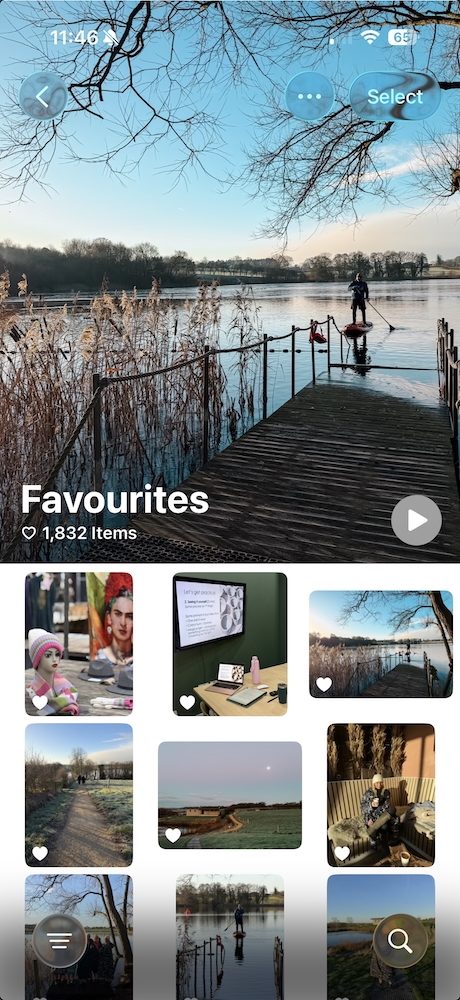
Using favourites can help more than people realise, as long as you treat them as a shortlist rather than a lifetime archive. These are the photos you’d happily want to find again or show someone else.
If your phone offers face recognition, taking a moment to name a few key people can also make searching much easier later on, without any manual sorting. And while search won’t always find that exact image you have in mind, it becomes far more useful once the overall clutter is reduced.
Get rid of Duplicates. Both Apple Photos and Google Photos can now spot duplicates for you. On an iPhone, look for the Duplicates album under Albums. In Google Photos, use Manage storage to review similar images. You don’t need to catch everything – deleting the obvious extras is enough to make a real difference.
A word about albums
Albums are optional.
Many people feel guilty for not using them, but most of us don’t browse albums very often anyway. If the idea of creating albums fills you with dread, you can skip them entirely.
If you do like the idea of albums, keep them few and broad, and make them practical rather than chronological. Most importantly, only add photos going forward. There is no need to go back and organise years of images unless you genuinely want to.
The biggest silent problem: screenshots
Screenshots quietly take over photo libraries.
They’re rarely sentimental, often temporary, and very easy to forget about. Reviewing screenshots once a month and deleting most of them can free up a surprising amount of space, both on your phone and in your head.
If a screenshot genuinely needs keeping, it’s usually better saved somewhere else rather than left to clutter your photo library.
Try timed clear-outs instead of “organising”
Rather than telling yourself you’ll organise your photos, try setting a short timer instead. Ten minutes is enough. Choose one simple task, such as clearing screenshots, favouriting last month’s photos, or deleting duplicates from one specific event. When the timer ends, stop.
Small wins are far more sustainable than grand plans that never quite happen.
Cloud storage, without the guilt
Paying for cloud storage isn’t a failure. It’s a modern reality. What tends to feel frustrating is paying for more storage while knowing that a lot of what’s being stored isn’t really needed. Even light, regular clear-outs slow that growth and make the whole system feel more intentional. This doesn’t have to be all or nothing to be worthwhile.
Make peace with your photo library
Your photos are there to be enjoyed, shared and remembered, not to make you feel behind or disorganised.
- You don’t need to fix the past.
- You don’t need a perfect system.
- You just need things to feel a little lighter and easier than they do now.
That really is enough.
This question comes up often in my phone photography workshops, where we talk about enjoying your photos rather than drowning in them. If you’d like help feeling more confident with your phone photography, you’re very welcome to join me.
No comments yet.