
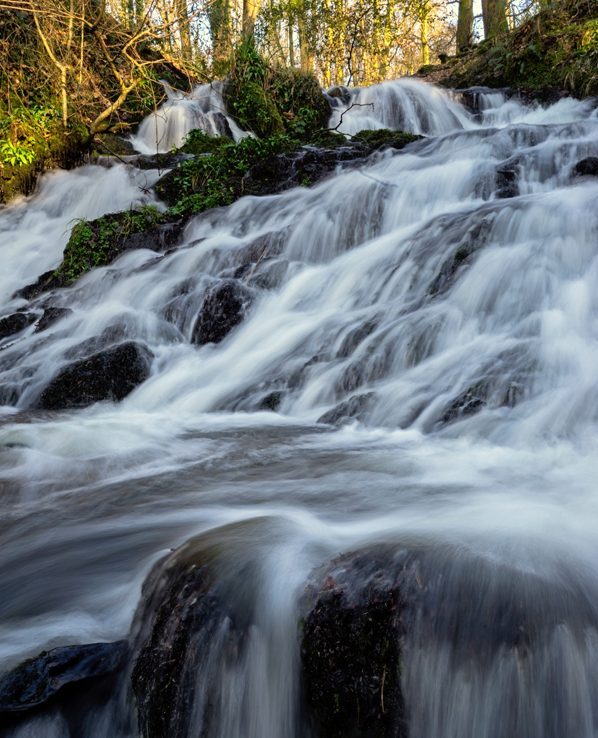
How to Photograph Waterfalls: Get That Smooth, Silky Water Effect
Photographing waterfalls using a slow shutter speed is a great way to create that smooth, silky water effect. It’s a technique that can look complicated, but once you understand a few key settings, it becomes much easier to achieve.Shutter speed refers to how long your camera’s sensor is exposed to light when you take a photo.
What is a slow shutter speed?
A fast shutter speed captures a moment very quickly, freezing movement. A slow shutter speed does the opposite - it keeps the shutter open for longer, allowing movement to be recorded over time.
With waterfalls, this is what creates that soft, flowing effect. Instead of seeing every individual drop of water, the movement is smoothed out, giving that “silky” look that you often see in landscape photography.
The slower the shutter speed, the more movement is blurred. Finding the right balance is part of the creative process, too fast and the water looks frozen, too slow and you can lose detail.
Step-by-Step: How to Photograph a Waterfall
- You will need to shoot in manual (M) or Shutter Priority Mode. Set the ISO to 100 and use a slow shutter speed, perhaps around 1/10 to start with. If you are shooting in Manual mode select a small aperture - f/11 or above. The smaller the aperture you use, the slower your shutter speed will be. Ideally you wouldn't go as high as I did in the shot above as lenses tend to be sharper throughout the image around f/11 but it was too bright.
- Experiment with different shutter speeds until you get the water to look as you would like it to. As the water could be flowing very fast or slow, there's no right or wrong shutter speed.
- Watch out for trees and leaves blowing around and looking blurred at the edges of your frame.
- You will, of course, need to use a tripod.
- A lens cloth will come in handy to wipe mist or water droplets off the front of the lens.
Use a filter to prevent images from being over-exposed
- If you are finding that your images are over exposed because of the slow shutter speeds, you can use a polarising filter, or, ideally a neutral density filter.
- Polarising filters will reduce the amount of light slightly and will help reduce reflections on the water.
- A neutral density filter is better as it reduces the light more. You can buy different strengths e.g. a ND 0.3 filter will reduce the light by one stop, whereas a ND 1.8 will reduce it by 6 stops.
- If you don't have any filters try to avoid shooting in bright sunlight; dull days or low light at the start or end of the day.
Composing your shot
- As with any shot your composition will make or break your image. You need foreground interest - in the shot above the focal point is on the large rock in the foreground. Your eye then travels up the waterfall.
- Try different angles - wide angle, portrait, zoomed in on a particular section. Try including more foreground, getting down low, getting higher up.
- If the sky is overcast and grey, don't include it.
No comments yet.